


The "No Wire, No Alignment" Smart Room Makeover with Aqara

Setting up a truly reactive smart room used to require an array of tools: power drills, masking tape to hide cables along the skirting boards, and a lot of patience to align tiny magnetic contact sensors perfectly.
Smart home pioneer Aqara is changing that narrative with its latest hardware lineup. Coinciding with the brand's official launch on Amazon Ireland, the team at Smart Home Tested put three of their newest devices to the test: the M200 Hub, the FP300 Presence Sensor, and the magnet-free P100 Multi-State Sensor.
The goal? A completely wireless, automated room makeover completed in minutes, requiring zero drilling, zero wiring, and zero alignment.

The Control Center: Aqara Hub M200
Every great smart ecosystem requires a reliable command center, and the Aqara Hub M200 serves as a powerful local core. Designed as a matte black puck with a clean, low-profile aesthetic, this multi-protocol device functions simultaneously as a Matter controller and a Thread border router.
Key Infrastructure Specs:
Connectivity: Features dual-band Wi-Fi 6 (2.4 GHz / 5 GHz) and a robust RJ45 Ethernet port supporting Power over Ethernet (PoE) for ultimate connection stability.
Local Automations: Rather than passing commands back and forth to the cloud, the M200 handles automation logic locally. It can manage up to 40 Zigbee and 40 Thread devices at once with virtually zero latency.
Integrated Siren: Houses a surprisingly loud 90 dB speaker that can be used as a home security siren, a custom chime, or a text-to-speech announcer using custom uploaded audio files.
Legacy Control: Built-in infrared transmitters allow you to bring older TVs, legacy air conditioning units, and older appliances into modern smart home ecosystems.
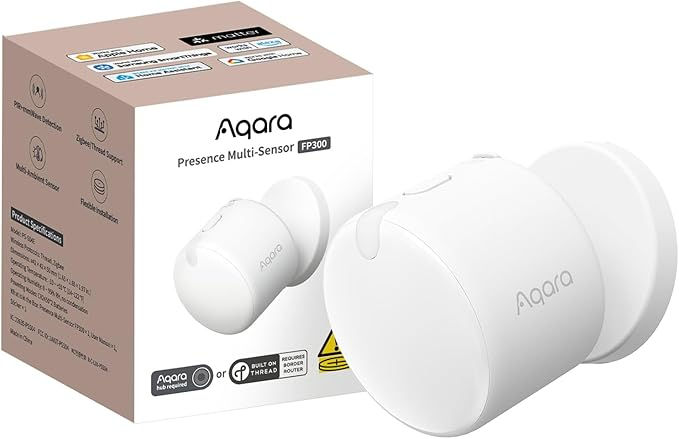
The Presence Detector: Aqara FP300 Multi-Ambient Sensor for the Perfect Smart Room Setup
Traditional PIR (Passive Infrared) motion sensors are great for catching you walking into a room, but the moment you sit down on the couch to read or watch a movie, the sensor loses you, leaving you sitting in the dark.
The Aqara FP300 solves this entirely. It is a tiny, battery-powered 5-in-1 powerhouse that utilizes a clever dual-technology approach. It combines a fast PIR sensor for instant motion detection with an ultra-sensitive 60 GHz millimeter-wave (mmWave) radar.
The PIR sensor instantly registers when someone walks into the room, while the 60 GHz radar tracks micro-movements—like breathing—to know if someone is still in the space, completely eliminating false "absent" reports.
Standout Hardware Features:
Wire-Free: Powered by two replaceable CR2450 batteries with an exceptional lifespan of up to 3 years—an impressive feat for power-hungry mmWave radar tech.
AI Spatial Learning: Employs advanced on-device machine learning to automatically map the room, filtering out repetitive background motions like moving curtains or rotating fans.
Environmental Monitoring: Beyond human presence, the tiny capsule tracks ambient light (lux levels), temperature, and humidity.
Dual Protocol Support: Operates as a dual Zigbee and Thread device. You can connect it natively to Matter platforms like Apple Home, Google Home, or Home Assistant without needing an Aqara hub, or route it through the Aqara app for maximum sensitivity adjustments.

The Sensor Upgrade: Aqara P100 Multi-State Sensor
Traditional door and window contact sensors rely on a two-part system—a sensor block and a magnet that must sit parallel to one another. The Aqara P100 eliminates the second magnet completely.
Housed in a single dinky unit, the P100 uses an internal 9-axis orientation sensor that tracks subtle physical changes in three-dimensional space. It measures tilt angle, vibration, drops, falls, and orientation entirely via internal angle tracking.
Creative Use Cases:
Self-Calibration: Upon setup, the sensor automatically calibrates its closed reference baseline. Because it doesn't need a secondary magnet to align with, it's perfect for non-standard openings like hopper windows, drawer lids, or mailbox flaps.
Advanced Tracking: When paired via the Aqara Zigbee hub, the P100 unlocks comprehensive telemetry including real-time shock and tilt data. When used directly via native Thread/Matter fabrics, it functions as a highly responsive open/close tracker.
Scene Controller: The sensor face supports a physical triple-tap gesture, allowing you to double its utility as a discrete wall switch or scene controller wherever it is stuck.

Real-World Testing: The No-Wire Automation Scenario
To put the hardware through its paces, the sensors were integrated into a seamless living room automation script using a magnetic 3M mount for the FP300.
Automation 1: Smart Illuminations
The FP300 was positioned to monitor the living room. As someone walks through the doorway, the rapid PIR sensor catches the movement, immediately triggering three separate ambient accent lights simultaneously: a floor lamp, a corner light, and the backlighting behind the TV. Because the 60 GHz radar monitors chest movements from breathing, the lights stay on continuously as long as the room is occupied—and safely power down once the room is genuinely vacant.
Automation 2: Climate and Window Coordination
The magnet-free P100 was adhered to a living room window. When the window is opened, the internal 9-axis sensor immediately registers the change in orientation. This can trigger an automation to temporarily kill the room's air conditioning to save energy. Conversely, as demonstrated in the setup, closing the window can immediately signal automated smart blinds to lower themselves smoothly into place.

The Verdict: Smart Life Simplified
Aqara's new hardware suite proves that sophisticated, millimeter-wave tracking and multi-angle security don't require complex electrical work or invasive installation. By utilizing low-power Thread and local Zigbee protocols, you can completely overhaul a room's reactive capabilities using nothing more than double-sided adhesive.
If you want a smarter home ecosystem that functions locally, safely, and effortlessly, this hardware trio represents the current gold standard of wire-free automation.
Amazon Ireland Link HERE
Watch the Wireless Makeover in Action
To see the step-by-step setup process, observe how quickly the lights react to the presence sensor, and see the P100 track window orientation live, check out the full video review from Smart Home Tested below:


Comments